Connecting to the cluster
The access to the cluster depends on the Operating System present on your personal laptop. If you have a Linux, Unix or OSX Operating System you can use the ssh client from command line, from whichever terminal.
Specifically, to connect to the Pleiadi cluster frontend as a user with a certain username, execute:
$ ssh <username>@pleiadi.oact.inaf.it
For example, for the user pippo the login command is:
$ ssh pippo@pleiadi.oact.inaf.it
After executing the ssh command, the login can be completed inserting a password or without the need of inserting a password, if a public key created on your laptop is provided to the cluster.
With the password: insert the password provided by the cluster administrator when your user was created on the cluster. It is recommended to change the provided password at first login with the
passwdcommand. Anyway, the password annually expires and the users can renew it with thepasswdcommand. There are no restrictions on the password length and composition but it is recommended to choose a password made of 8 or more characters, containing numbers and both uppercase and lowercase letters.With key exchange:
Create on your laptop a public/private couple of keys, with the command
$ ssh-keygen, confirming the default values during the procedure. With this command, a public (id_rsa.pub) and a private (id_rsa) key are created in the.sshdirectory of your laptop.Login to Pleiadi inserting the password provided by the administrator.
Append the content of the
id_rsa.pubkey created on your laptop in the/home/pippo/.ssh/authorized_keysfile.From the next login, you will be able to execute
$ ssh pippo@pleiadi.oact.inaf.itwithout password insertion.
If you have a Windows Operating System on your laptop, it is recommended to use the PuTTY application (available at the website PuTTY), to be configured as in the below figure:
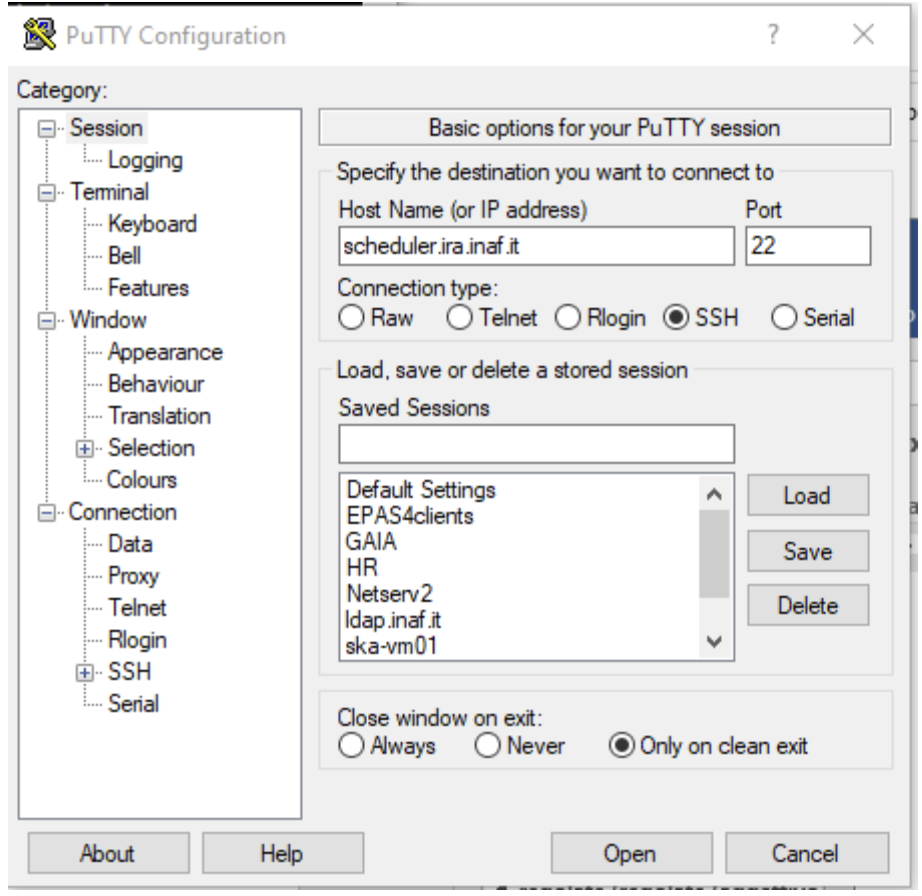
Figure 1: Putty - Configuration for the access to remote clusters from computers with Windows Operating System.